AI in Production: 7 Mistakes That Make AI Features Fail
The demo worked beautifully. Then real users arrived. These are the seven most common reasons AI features disappoint after launch, and the practical fix for each one.
ABAgentBuildLog team3 min read
Building an impressive AI demo takes an afternoon. Building an AI feature that still works after a thousand real users have tried it takes something else. The gap between the two is where most AI projects quietly fail.
Here are the seven mistakes we see most often, and what to do instead.
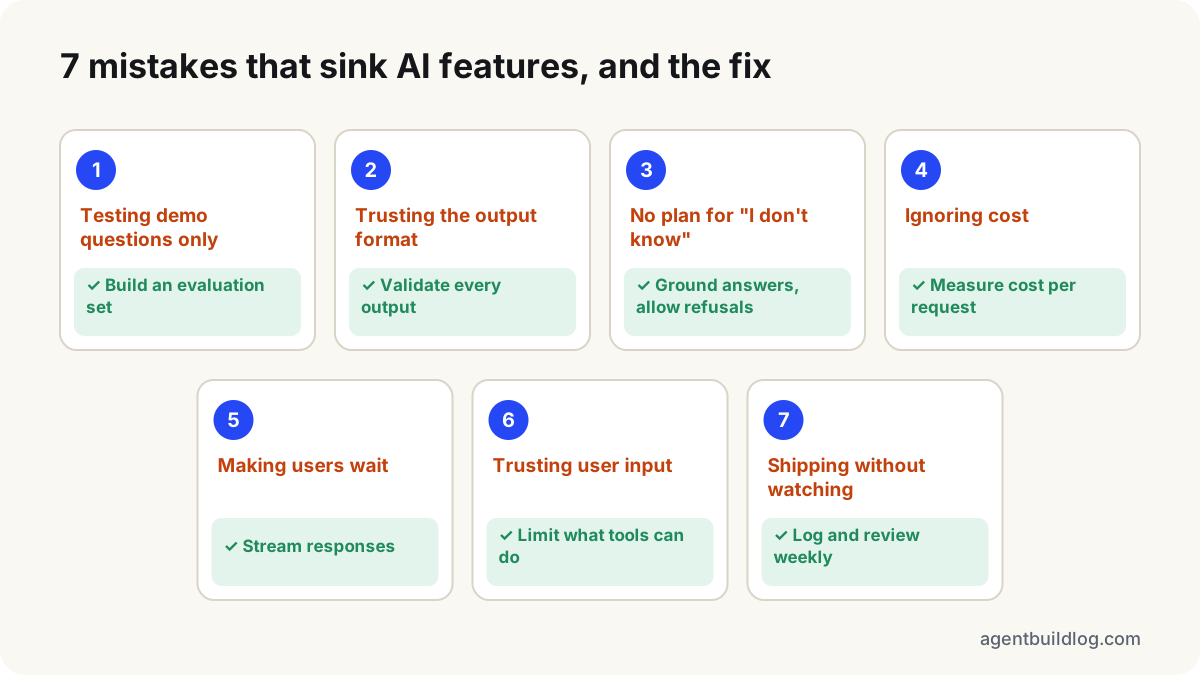
1. Testing with the demo questions only
The prompt was tuned on the five examples the team kept trying. Real users ask in other ways, with typos, missing context and other languages.
Fix: collect 30–100 realistic inputs, including awkward ones, and write down what a good answer looks like for each. Run this set every time you change the prompt or the model. That collection is your evaluation set, and it's the single most valuable asset in an AI project.
2. Trusting the output format
The code assumes the model returns clean JSON, or exactly one of three labels. It does, until it doesn't, and something downstream breaks.
Fix: validate every model output against a schema before using it. When validation fails, retry with the error message, and after a couple of attempts fail loudly. (Our tutorial Structured Output From LLMs shows the whole pattern.)
3. No plan for "I don't know"
Asked something it can't answer, the model makes up something plausible. Users can't tell the difference, and trust disappears the first time they catch it.
Fix: give the model explicit permission and instructions to say it doesn't know. Ground answers in retrieved sources where possible, and show those sources to users so they can check.
4. Ignoring cost until the invoice arrives
Long prompts, large models on simple tasks and retry loops add up. A feature that costs a fraction of a cent in testing can cost real money at scale.
Fix: measure the cost per request from day one. Use the smallest model that passes your evaluation set, cache repeated prompts where your provider supports it, and set hard limits on retries and agent steps.
5. Making users wait in silence
Large models can take several seconds to respond. A blank screen for that long feels broken.
Fix: stream the response so text appears as it's generated, show progress for multi-step tasks, and move slow work into the background where the user doesn't need to wait for it.
6. Treating user input as trusted
If your feature reads emails, web pages or uploaded files, those can contain instructions aimed at your model, such as "ignore your previous instructions and…". This is prompt injection, and there's no prompt that fully prevents it.
Fix: limit what the model can do, not just what it's told. Give tools the minimum permissions they need, keep secrets out of prompts, and require a human to confirm consequential actions like sending, paying or deleting.
7. Shipping without watching
After launch nobody looks at what the model actually says to real users. Quality drifts when the provider updates the model or users find new ways to ask, and nobody notices until complaints arrive.
Fix: log inputs and outputs (respecting your privacy commitments), add a simple thumbs up/down, and review a sample every week. Feed real failures back into your evaluation set so the same bug can't return.
The common thread
Every one of these mistakes treats an AI feature like ordinary software: build it, test it once, ship it. AI features are closer to a living system: their inputs are open-ended and their behaviour is probabilistic.
The teams that succeed don't have better prompts. They have better feedback loops: an evaluation set, validation on every output, and a habit of looking at real results. Build those first, and the prompt engineering gets much easier.
Weekly briefing
The AI build log, once a week
The news that matters and our newest tutorials. No hype, no spam.
One-click unsubscribe anytime.
More blog
Blog
RAG vs Fine-Tuning (LoRA) vs Long Context: Which Does Your AI App Need?
Three ways to give a language model knowledge it doesn't have, and they solve different problems. A practical guide to choosing, with a simple decision path you can apply to your own project.
Blog
What Is an AI Agent? Agentic AI Explained in Plain Words
"AI agent" is everywhere, and it means three different things depending on who's selling. Here's a clear definition, the four parts every agent has, and how to tell a real agent from a chatbot with a new label.