Build an AI Agent With Function Calling in TypeScript (Tool Calling From Scratch)
Write a working AI agent loop in about 80 lines of TypeScript, with no framework. The model decides when to call your functions, and you stay in control of every step.
ABAgentBuildLog team5 min read
Contents
An AI agent is a language model running in a loop. Using function calling (also called tool calling), it can call functions you give it, read the results, and decide what to do next until the task is done. You don't need a framework to build one. In this tutorial you'll write the whole loop yourself in about 80 lines of TypeScript, so you understand exactly what agent frameworks do for you.
By the end you'll have an agent that answers questions like "What is 18% of 2,450, and what time is it in Tokyo right now?" by calling two tools you wrote.
What you need
- Node.js 20 or newer (it has
fetchbuilt in). - An API key for any provider with an OpenAI-compatible chat completions API that supports tool calling, such as OpenAI, Groq, OpenRouter or a local server like Ollama.
- The name of a model on that provider that supports tools.
Set three environment variables:
export LLM_BASE_URL="https://api.openai.com/v1"   # or your provider's base URL
export LLM_API_KEY="sk-..."
export LLM_MODEL="your-model-name"
How the loop works
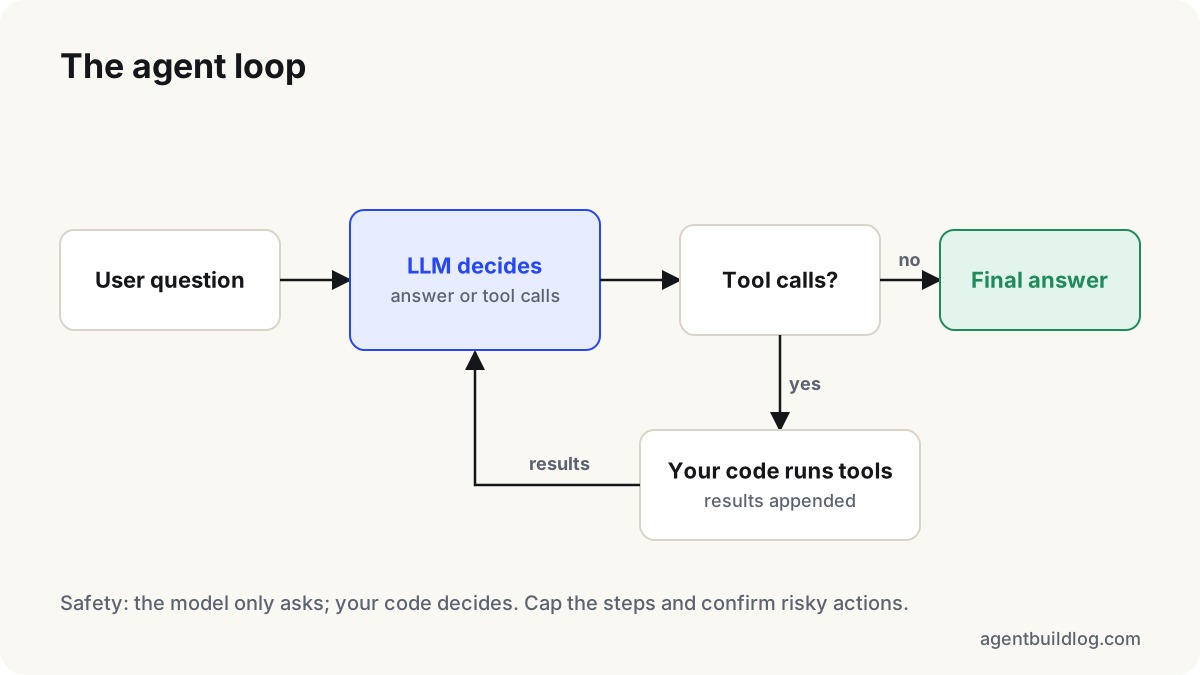
Every turn has the same shape:
- You send the conversation plus a list of tools (name, description, JSON Schema for arguments).
- The model replies with either a final text answer, or one or more tool calls.
- If it asked for tools, your code runs them and appends each result to the conversation.
- Repeat until the model answers, or until you hit a step limit.
The model never runs anything itself. It only asks, and your code decides whether to actually do it. That's the key safety property of tool calling.
Step 1: Describe the tools (function definitions)
Each tool is a name, a plain-English description and a JSON Schema for its arguments. The description matters more than you'd think, because it's how the model decides when to use the tool.
const tools = [
  {
    type: "function",
    function: {
      name: "percentage",
      description: "Calculate a percentage of a number. Use for any 'X% of Y' question.",
      parameters: {
        type: "object",
        properties: {
          value: { type: "number", description: "The base number" },
          percent: { type: "number", description: "The percentage, e.g. 18 for 18%" },
        },
        required: ["value", "percent"],
      },
    },
  },
  {
    type: "function",
    function: {
      name: "current_time",
      description: "Get the current local time in an IANA time zone such as 'Asia/Tokyo'.",
      parameters: {
        type: "object",
        properties: { timezone: { type: "string" } },
        required: ["timezone"],
      },
    },
  },
];
Step 2: Write the real functions
These are ordinary functions. Keep them small and make them return plain JSON-friendly objects.
type Handler = (args: any) => unknown;

const handlers: Record<string, Handler> = {
  percentage: ({ value, percent }) => ({ result: (value * percent) / 100 }),
  current_time: ({ timezone }) => ({
    timezone,
    time: new Date().toLocaleString("en-US", { timeZone: timezone }),
  }),
};
Notice that current_time will throw for an invalid time zone. We'll catch that and send the error back to the model, so it can correct itself instead of crashing your program.
Step 3: The loop
const { LLM_BASE_URL, LLM_API_KEY, LLM_MODEL } = process.env;
const MAX_STEPS = 6;

async function chat(messages: any[]) {
  const res = await fetch(`${LLM_BASE_URL}/chat/completions`, {
    method: "POST",
    headers: { authorization: `Bearer ${LLM_API_KEY}`, "content-type": "application/json" },
    body: JSON.stringify({ model: LLM_MODEL, messages, tools }),
  });
  if (!res.ok) throw new Error(`LLM error ${res.status}: ${await res.text()}`);
  const data = await res.json();
  return data.choices[0].message;
}

export async function runAgent(question: string): Promise<string> {
  const messages: any[] = [
    { role: "system", content: "You are a precise assistant. Use tools for math and time; never guess them." },
    { role: "user", content: question },
  ];

  for (let step = 0; step < MAX_STEPS; step++) {
    const msg = await chat(messages);
    messages.push(msg); // keep the assistant turn, including its tool_calls

    if (!msg.tool_calls?.length) return msg.content; // final answer

    for (const call of msg.tool_calls) {
      const handler = handlers[call.function.name];
      let result: unknown;
      try {
        if (!handler) throw new Error(`Unknown tool: ${call.function.name}`);
        result = await handler(JSON.parse(call.function.arguments));
      } catch (err) {
        result = { error: String(err) }; // let the model see and recover from errors
      }
      messages.push({ role: "tool", tool_call_id: call.id, content: JSON.stringify(result) });
    }
  }
  throw new Error(`Agent stopped after ${MAX_STEPS} steps without an answer`);
}

runAgent("What is 18% of 2,450, and what time is it in Tokyo right now?").then(console.log);
Run it with npx tsx agent.ts. A typical run takes two model calls: one that returns two tool calls at once (the model can call tools in parallel), and one that writes the final answer using both results.
Three details that matter
1. Push the assistant message before the tool results. The API expects every tool message to follow the assistant message whose tool_calls it answers, matched by tool_call_id. If you skip the assistant message, most providers reject the request.
2. Arguments arrive as a JSON string. call.function.arguments is text the model wrote. It's usually valid JSON, but not always. That's why JSON.parse sits inside the try. For anything important, validate the parsed object with a schema library before using it (see our tutorial on structured output from LLMs).
3. Always cap the steps. A model can loop: call a tool, misread the result, call it again. MAX_STEPS turns a runaway bill into a clear error. Pick a limit that fits your task, and log every step while you develop.
Where to go from here
- Add real tools. A search API, a database query, a "send email" function. Treat any tool with side effects (sending, paying, deleting) as dangerous: ask the user to confirm before running it.
- Add memory. The
messagesarray is the agent's short-term memory. Save it to resume a conversation, and trim or summarise old turns when it grows long. - Then consider a framework. Now that you know the loop, frameworks are just this pattern plus retries, tracing and integrations. You'll be able to tell which parts you actually need.
The whole idea fits in one sentence: the model proposes, your code disposes. Everything else in agent engineering builds on that loop.
Weekly briefing
The AI build log, once a week
The news that matters and our newest tutorials. No hype, no spam.
One-click unsubscribe anytime.
More tutorials
Tutorial
Structured Output From LLMs: Get Reliable JSON With Validation and Retries
LLMs return almost-valid JSON surprisingly often. Here's a small, provider-agnostic pattern in TypeScript that turns model output into data you can trust, using JSON mode, Zod validation and a retry with feedback.
Tutorial
Build a RAG System in Python From Scratch: RAG for LLMs Explained
Retrieval-augmented generation lets an LLM answer questions about your own documents. Build every step yourself in plain Python: chunking, embeddings, search and a grounded answer with citations.