Build a RAG System in Python From Scratch: RAG for LLMs Explained
Retrieval-augmented generation lets an LLM answer questions about your own documents. Build every step yourself in plain Python: chunking, embeddings, search and a grounded answer with citations.
ABAgentBuildLog team3 min read
Contents
Retrieval-augmented generation (RAG) means you look up the relevant parts of your own documents first, then hand those passages to a language model along with the question. The model answers from your text instead of from memory. That cuts made-up answers and lets you cite sources.
In this tutorial you'll build a complete RAG pipeline in plain Python with requests and numpy. There's no vector database and no framework, so every step is visible.
What you need
pip install requests numpy
export LLM_BASE_URL="https://api.openai.com/v1"   # any OpenAI-compatible provider
export LLM_API_KEY="sk-..."
export CHAT_MODEL="your-chat-model"
export EMBED_MODEL="your-embedding-model"
You need a provider that offers both a chat model and an embeddings model on the OpenAI-compatible API.
The pipeline at a glance
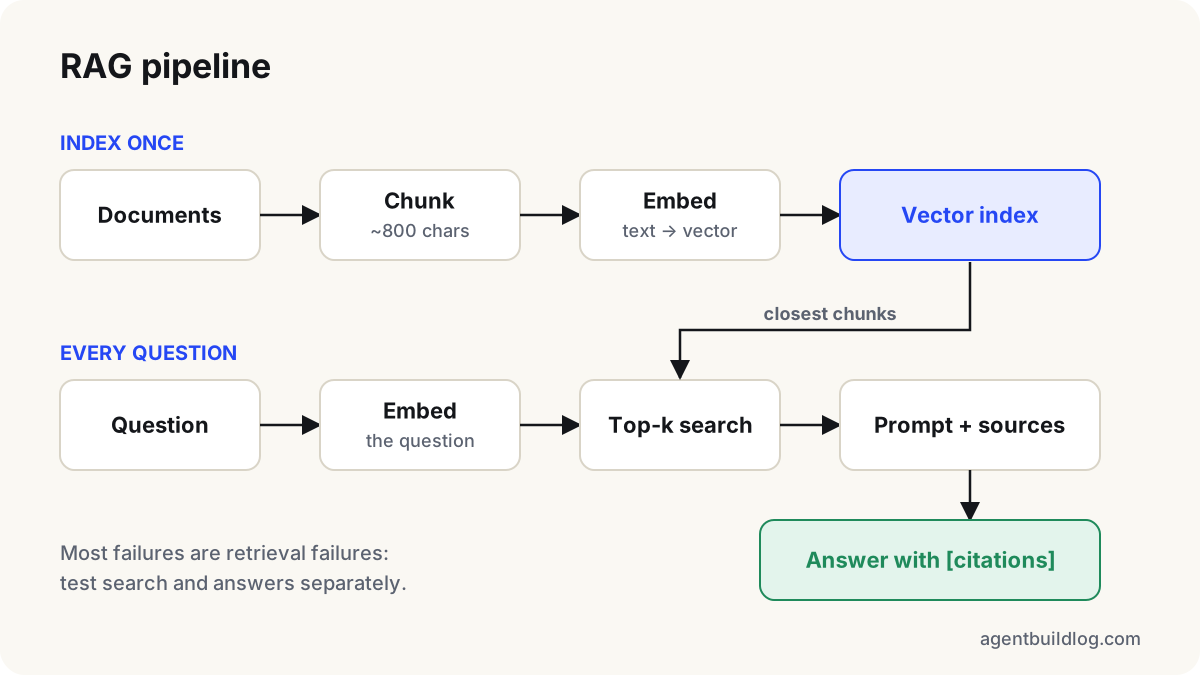
There are two phases:
- Indexing (once): split documents into chunks, turn each chunk into an embedding vector, store the vectors.
- Answering (every question): embed the question, find the most similar chunks, and ask the model to answer only from them.
Step 1: Chunk the documents
Models work best with focused passages. We split on paragraphs and pack them into chunks of roughly 800 characters, with a small overlap so a sentence cut at a boundary still appears whole in one chunk.
def chunk_text(text: str, size: int = 800, overlap: int = 150) -> list[str]:
    paragraphs = [p.strip() for p in text.split("\n\n") if p.strip()]
    chunks, current = [], ""
    for p in paragraphs:
        if current and len(current) + len(p) > size:
            chunks.append(current)
            current = current[-overlap:]  # carry a little context forward
        current = f"{current}\n\n{p}" if current else p
    if current:
        chunks.append(current)
    return chunks
Chunk size is the setting that most changes answer quality. Too small and chunks lose context; too large and the search becomes vague. Between 500 and 1,500 characters is a sensible starting range. Test with your own questions.
Step 2: Embed the chunks
An embedding is a list of numbers that captures meaning: texts about similar things get similar vectors. One API call can embed many chunks at once.
import os, requests, numpy as np

BASE, KEY = os.environ["LLM_BASE_URL"], os.environ["LLM_API_KEY"]
HEADERS = {"Authorization": f"Bearer {KEY}"}

def embed(texts: list[str]) -> np.ndarray:
    r = requests.post(f"{BASE}/embeddings", headers=HEADERS, timeout=60,
                      json={"model": os.environ["EMBED_MODEL"], "input": texts})
    r.raise_for_status()
    vectors = np.array([d["embedding"] for d in r.json()["data"]], dtype=np.float32)
    # Normalise so a plain dot product equals cosine similarity.
    return vectors / np.linalg.norm(vectors, axis=1, keepdims=True)
For large document sets, send the chunks in batches of a few hundred and save the resulting array with np.save, so you only pay for embeddings once.
Step 3: Search
Because the vectors are normalised, similarity is just a matrix multiplication. That's fast enough for tens of thousands of chunks on a laptop.
def search(question: str, chunks: list[str], vectors: np.ndarray, k: int = 4):
    q = embed([question])[0]
    scores = vectors @ q
    best = np.argsort(scores)[::-1][:k]
    return [(int(i), float(scores[i]), chunks[i]) for i in best]
You only need a vector database when this stops being fast enough, or when you need filtering, updates and persistence at scale. Start simple.
Step 4: Answer with citations
The prompt does two jobs: it gives the model the retrieved passages, and it tells the model to refuse when they don't contain the answer.
def answer(question: str, chunks, vectors) -> str:
    hits = search(question, chunks, vectors)
    context = "\n\n".join(f"[{i}] {text}" for i, _, text in hits)
    messages = [
        {"role": "system", "content":
            "Answer only from the numbered sources. Cite them like [3]. "
            "If the sources do not contain the answer, say you don't know."},
        {"role": "user", "content": f"Sources:\n{context}\n\nQuestion: {question}"},
    ]
    r = requests.post(f"{BASE}/chat/completions", headers=HEADERS, timeout=60,
                      json={"model": os.environ["CHAT_MODEL"], "messages": messages})
    r.raise_for_status()
    return r.json()["choices"][0]["message"]["content"]
Put it together
text = open("handbook.txt", encoding="utf-8").read()
chunks = chunk_text(text)
vectors = embed(chunks)
print(answer("How many vacation days do new employees get?", chunks, vectors))
How to tell whether it works
Don't judge a RAG system by one good answer. Write down 15–20 real questions with the answers you expect, and check two things separately:
- Retrieval: does
searchreturn the chunk that contains the answer in its top results? If not, fix chunking or the number of results, not the prompt. - Generation: given the right chunk, does the model answer correctly and cite it? If not, tighten the prompt.
Most RAG failures are retrieval failures. Measuring the two halves separately tells you which half to fix.
Next steps
- Add hybrid search: combine embedding scores with simple keyword matching, which helps with names, codes and exact phrases.
- Store each chunk's source file and heading so citations can link back to the original.
- Re-embed only the documents that changed, keyed by a hash of their text.
Weekly briefing
The AI build log, once a week
The news that matters and our newest tutorials. No hype, no spam.
One-click unsubscribe anytime.
More tutorials
Tutorial
Structured Output From LLMs: Get Reliable JSON With Validation and Retries
LLMs return almost-valid JSON surprisingly often. Here's a small, provider-agnostic pattern in TypeScript that turns model output into data you can trust, using JSON mode, Zod validation and a retry with feedback.
Tutorial
Build an AI Agent With Function Calling in TypeScript (Tool Calling From Scratch)
Write a working AI agent loop in about 80 lines of TypeScript, with no framework. The model decides when to call your functions, and you stay in control of every step.